
Your first AI app: one task, one model
Builder · Projects
“I can follow an API tutorial, but I do not know what makes it a usable project.”
Choose a narrow project
Build a note-to-checklist tool. It receives a short note and returns the actions explicitly stated in that note. It does not send email, create calendar events or make decisions for the user. Keeping those boundaries clear gives you a project you can explain and test.
Before coding, write three sample notes and the checklist you would expect from each. Include a note with no actions. This gives the application a purpose beyond proving that an API request can return text.
Draw the smallest useful system
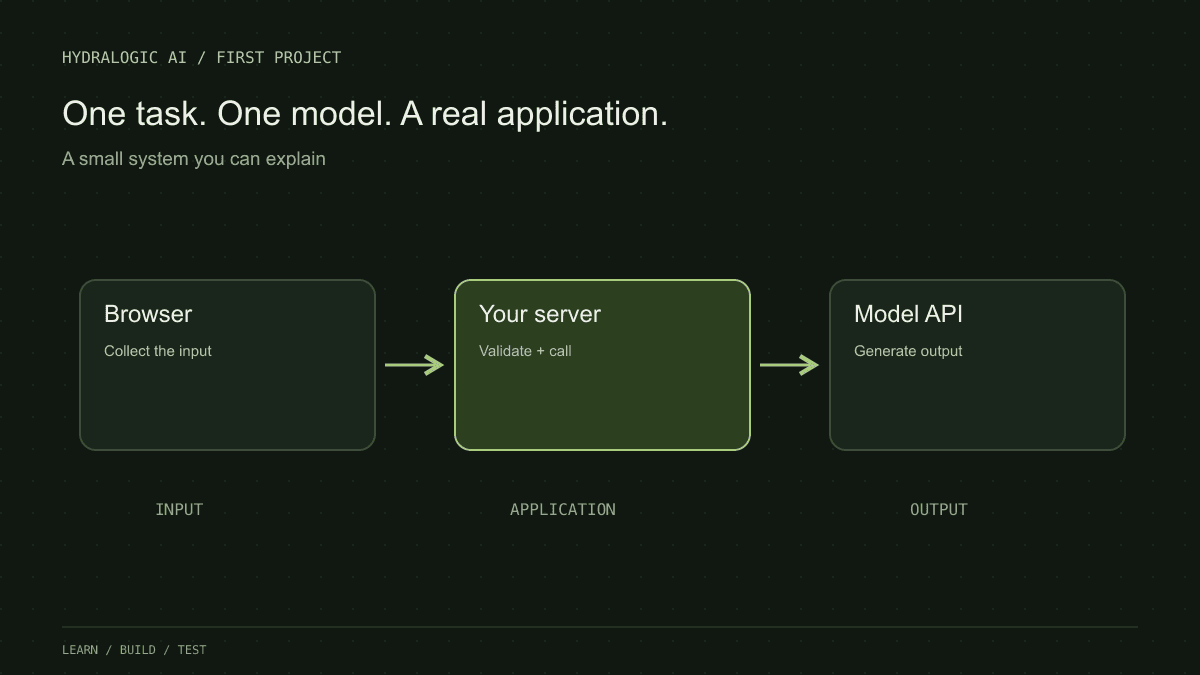
Use a browser form, your server, a hosted model API and a result view. The browser sends the note to your server. The server validates the input, makes the model request and validates the response before returning it. Keep provider credentials on the server; never ship them in browser code.
This is a suggested teaching architecture, not a provider-specific API snippet. Use the current official SDK documentation for request fields and supported model identifiers.
Browser form
    → POST /api/checklist
    → validate note length and required fields
    → call model with bounded output
    → validate result shape
    → show checklist or a clear error
Treat generated output as input to your program
If your view expects an array of strings, validate that shape. Handle missing fields, unexpected types and empty results. A model response that looks like JSON in a chat window is not the same thing as an object your program has safely accepted.
Render returned text as text. Keep model-generated content out of executable code paths. Even a small learning project benefits from a clear separation between language output and application actions.
Add the unglamorous states
A usable demo has more than a success screen. Show a loading state, preserve the note when a request fails, and prevent accidental repeated submissions. Decide what happens when the provider times out. A retry should be bounded rather than an endless loop.
For a shared demo, add usage limits and inspect the provider’s usage reporting. API calls may cost money; do not expose an unrestricted endpoint and assume a hidden button protects it. Avoid logging private notes while debugging.
Finish with a small test record
Run the three notes you wrote before coding and add the first failure you discover. Save expected behaviour, actual behaviour and your next change. A useful README includes setup, configuration names without secrets, the request flow and known limitations.
- Ordinary note: extract only the stated actions.
- No-action note: return an empty checklist or the agreed empty state.
- Contradictory note: preserve uncertainty instead of inventing a decision.
- Provider failure: show a recoverable error without losing the input.
Add complexity only after finding a need
An agent lets a model choose parts of the next action dynamically; a fixed workflow follows a structure you define. Neither is a badge of project quality. Your checklist tool may work perfectly well with one call.
A second step becomes useful when you can name the problem it solves. For example, a validation stage might reject unsupported checklist items. Measure that improvement before adding another layer.
Written by Hydralogic AI, not yet reviewed by a second person. Checked at primary sources, linked below.
A little practice. A clearer next step.
Twelve free questions with explanations. Choose your track. No account, no card.